Fast, private, browser-native

Open and share CBCT dental scans instantly

CBCTHub is a web-based DICOM viewer designed for dentists, radiologists, and surgeons. Open and analyze CBCT scans directly in your browser with 100% local processing for maximum speed and privacy. Easily share studies with secure links — no downloads, no setup.

No credit card required

cbcthub.com/viewer

Works with every major CBCT brand

CarestreamPlanmecaVatechSironaMoritaNewTomInstrumentariumPreXionDENTSPLYKaVo

100%

Local processing

0

Server costs

1 link

Sharing method

<30s

Setup time

WHY CBCTHUB?

Everything you need. Nothing to install.

Desktop CBCT software means license fees, IT support, and version headaches. CBCTHub replaces all of that with a URL.

Zero setup

There's no installer, no config file, no IT ticket. Open your browser and you're reading scans.

Collaborate on the scan itself

Drop a comment on any slice and share a link that opens to that exact finding. No more screenshot emails.

Works on any machine

Your office desktop, your laptop at home, a tablet at a conference. If it has a browser, it works.

Your images stay yours

Every pixel is rendered locally. DICOM data never touches our servers — not even temporarily.

Real diagnostic tools

MPR, freehand panoramics, oblique slices, cross-sections, measurements, implant simulation — the works.

Always current

Updates ship automatically. No patches to install, no compatibility breaks, no downtime.

HOW IT WORKS

From DICOM folder to shared link in under a minute

No software. No accounts for recipients. Just drag, view, share.

Step 01

Drop in your files

Drag a DICOM folder or ZIP into the browser. Full-arch, maxillary, mandibular, and TMJ — all supported.

Step 02

View it instantly

MPR, panoramic, and oblique views load in seconds. All the tools you'd expect, right in the browser.

Step 03

Share a link

Generate a secure link and send it over email or WhatsApp. Attach a PDF report if you want.

Step 04

Discuss it together

Leave comments on specific slices, or go live and walk someone through the scan in real time.

Your images are processed 100% in your browser They never reach our servers.

Powered by WebAssembly. We only store lightweight metadata.

FEATURES

Built for the way radiologists actually work

Every reconstruction and measurement tool you need — no plugins, no extras.

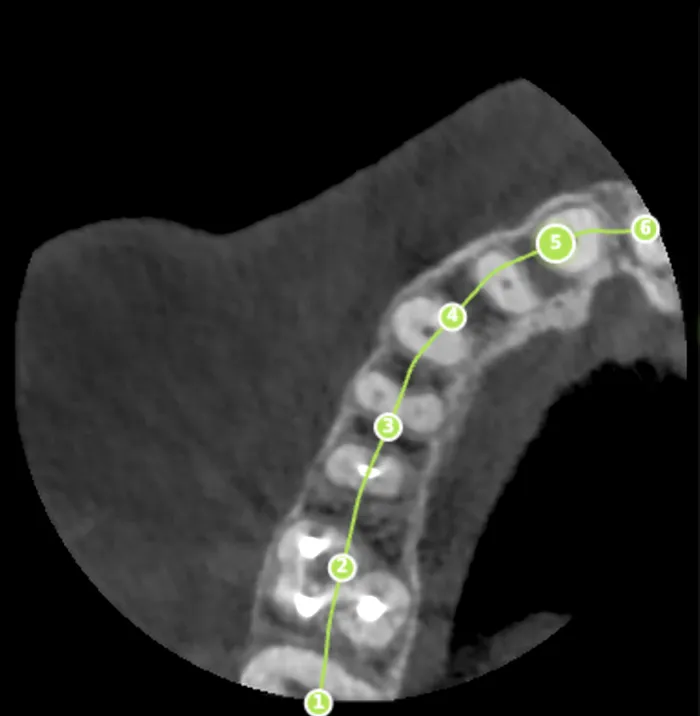
Panoramic curve

Panoramic curve

Trace the arch, get a panoramic instantly. Adjust thickness from 1 to 40 mm and regenerate in real time.

USE CASES

Used across every dental specialty

From implant planning to fracture evaluation — one viewer handles it all.

🦷

Implantology

Map the nerve, measure bone height, and simulate placement with oblique and cross-sectional views.

📏

Orthodontics

Evaluate root proximity, airway dimensions, and facial symmetry across MPR and panoramic reconstructions.

🔬

Endodontics

Find extra canals, vertical root fractures, and periapical pathology in high-resolution axial slices.

⚕️

Oral & maxillofacial surgery

Assess fractures, cysts, and impacted third molars with full multiplanar reconstructions.

Try it free

Use your own scans

NEW

Real-time collaboration

More than a viewer: a collaboration platform

Stop sending screenshots via WhatsApp. Discuss findings, present scans, and generate reports — all inside CBCTHub.

Discuss findings directly on the scan

Leave comments pinned to the exact slice. Each message includes a link that takes you to the finding in the correct view.

Comments pinned to the finding's slice

Shareable links to the exact view

Complete discussion history

Perfect for consultations

cbcthub.com/viewer

Dr. Rosas

I see a periapical radiolucent lesion on tooth 3.6

10:32

Dr. Méndez

Agreed. About 8mm. Do you see canal involvement?

10:34

Dr. Rosas

Yes, the mesial canal shows resorption. I marked the slice.

10:35

Example workflow

The radiologist uploads the CBCT scan, reviews it, and leaves comments on relevant findings. Then starts a live stream and sends the link to the dentist. The dentist opens the link and sees in their browser exactly what the radiologist is showing. When done, they export the analysis as PDF with all documented findings.

COMPARISON

Why switch from desktop software?

CDs, USB drives, and heavy installers made sense ten years ago. Here's what's different now.

Setup

Download, install, configure

Open a browser tab

Cost

$500+/year for a license

Free tier included

Sharing

Burn a CD or email a ZIP

Send a secure link

Access

One workstation only

Any device, anywhere

Updates

Manual patches that can break things

Always up to date, automatically

Privacy

Depends on the vendor

100% local — images never leave your browser

Collaboration

Screenshots over email

Comments linked to the exact slice

Presentations

Screen-share over Zoom

Built-in live streaming, synced in real time

SECURITY

Your data never leaves the browser

CBCTHub was designed so your DICOM files are never uploaded. Processing happens on your machine, period.

Local rendering

DICOM images are decoded and displayed using WebAssembly on your device. Nothing is transmitted to our servers.

End-to-end encryption

Every connection uses TLS 1.3. Shared links are single-use tokens that can't be guessed or reused.

You control access

Set who can view each study, and for how long. Links expire on your terms.

Delete means delete

Remove a study and it's gone from our infrastructure — permanently, with no hidden copies.

PRICING

Simple pricing. No surprises.

Start free. Upgrade when you're ready.

Free

Get to know the viewer

$0
  • 2 GB storage
  • All views included
  • Measurements
  • 100% local processing
  • Shareable link
Start free
MOST POPULAR

Pro

For independent practitioners

$20/mes
  • 350 GB storage
  • Upload radiographs
  • All views included
  • PDF reports
  • Slice-level comments
  • Live presentation
  • Your logo & branding
  • Priority support
Go Pro

Max

For teams up to 5

$59.99/mes
  • 1.5 TB storage
  • Everything in Pro
  • 5 seats included
  • Patient management
  • Team collaboration
  • Dedicated support
Go Max

FAQ

Questions? Answered.

Everything you need to know before getting started

Where are my DICOM files processed?+

On your machine, in your browser. DICOM images are never sent to our servers. We only store the lightweight metadata needed to organize your study list.

What file formats can I upload?+

Standard DICOM files (.dcm, .dicom, .ima) and compressed archives (ZIP, RAR, 7z, TAR.GZ) that contain them. Works with every major CBCT brand out of the box.

Can I share a study with a patient?+

Yes — every study gets a unique secure link. Send it over email or WhatsApp and the recipient can view the full scan in their browser. No account, no download.

Does it work on phones and tablets?+

The full viewer is optimized for desktops and laptops where you have room for all the tools. Shared study pages are responsive and work on any device.

Can I include a PDF report?+

Absolutely. Attach a PDF to any study. When you share the link, recipients see the report right alongside the scan.

What happens when I outgrow the free plan?+

Upgrade to Pro or Max for unlimited studies. No annual contracts — cancel anytime.

Which scanners are compatible?+

Anything that exports standard DICOM: Carestream, Planmeca, Vatech, Sirona, Morita, NewTom, and many others.

Do I need a fast connection?+

Only for the initial upload. Once the study is loaded, the viewer runs entirely offline in your browser.

How do comments on slices work?+

Pin a comment to any slice in any view — MPR, oblique, or panoramic. It generates a deep link that opens directly to that finding. Think of it as Google Docs comments, but for CBCT scans.

What's live presentation mode?+

It lets you walk through a scan in real time with someone else watching. They see everything you see — the same slice, cursor, annotations, and window/level — all synced instantly. No Zoom screen-share required.

Ready to try CBCTHub CBCTHub?

Hundreds of dental professionals already use CBCTHub to read and share CBCT scans. See why.

No credit card. No setup. Just open and go.